
For vertical video · 9:16
TikTok Visualizer That Finds Your Hook
Drop a song and its cover. The hook finder suggests a 15–30 second chorus slice, a safe-zone guide keeps captions clear, and you export a vertical MP4 in your browser.
Free: 720p with a small watermark. Clean 1080×1920 export: $4.99 once, no subscription.
How it works
From file to finished video in three steps.
- 01
Drop the song and cover
Add an MP3, WAV, M4A or FLAC file plus your artwork. The visualizer pulls its colors from the cover, and the audio is analyzed locally in your browser.
- 02
Take the suggested hook, or move it
The hook finder marks a 15–30 second slice where the track's energy peaks. Drag the handles to adjust it, or tap a 15, 30 or 60 second quick clip.
- 03
Check the safe zone and export
Turn on the caption-safe overlay to see where on-screen text and buttons tend to sit, then export a 9:16 MP4 with H.264 video and AAC audio.
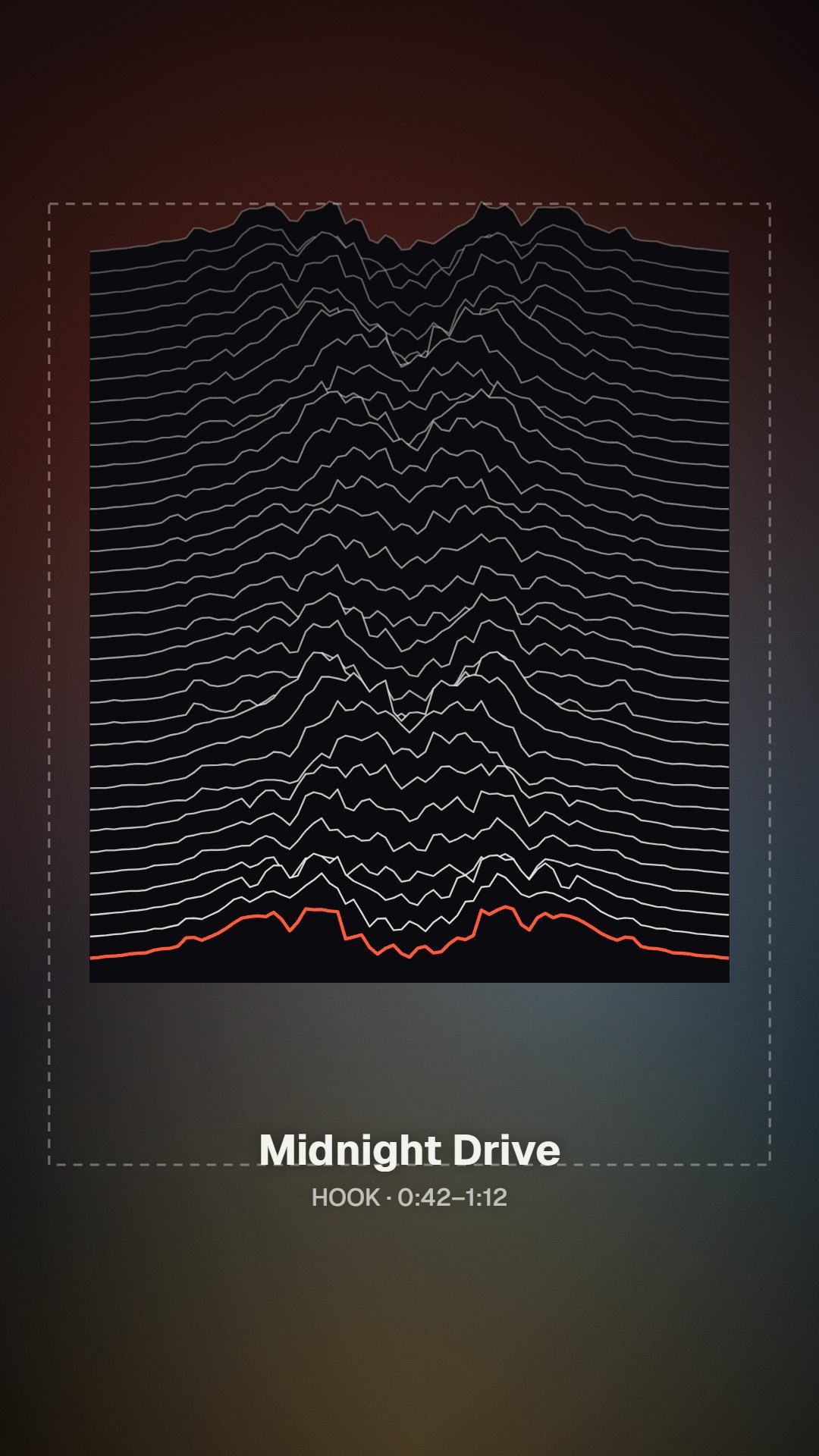
The hook finder · early access
Start the clip where the song already has the listener
On a vertical feed, viewers decide quickly whether to keep watching, so the slice you choose matters more than the visual style. The hook finder reads the loudness and energy of your track in the browser and suggests the 15–30 seconds most likely to be the chorus or drop. It is a starting point, not a verdict: you can drag either handle, preview the result and try a different section before exporting. Nothing is uploaded to make the suggestion, and the same analysis drives the visual you see.
Energy-based, not guesswork
The suggestion comes from in-browser analysis of where your track gets louder and denser, which is often the chorus or the drop.
You keep the final say
Draggable handles, a live preview and 15, 30 and 60 second quick buttons let you override the suggestion whenever your ear disagrees.
Caption-safe overlay
A guide shades roughly the top 14% and bottom 20% of the frame, where captions, buttons and your handle often appear. These are conservative margins we chose, not official platform numbers.
One clip, three feeds
The same 9:16 file works for TikTok, Instagram Reels and YouTube Shorts, so one export covers your release-week posts.
Who it's for
Built for the way you release.
Artists counting down to release day
Cut a teaser from the chorus a week out, then post fresh slices of the same song once it is live.
Producers sharing beats and drops
Find the drop, frame it with a Bars or Ridge visual and post a short snippet without opening a video editor.
Managers and small labels
Turn each release on the roster into vertical clips. The Pro plan adds a commercial license for client work.
TikTok visualizer export specs
| Frame | 9:16 vertical. 720×1280 on the free tier; 1080×1920 with Single HD, Release Kit, Creator or Pro. |
|---|---|
| Clip length | Hook finder suggests 15–30 s; quick buttons for 15, 30 and 60 s; free exports run up to 6 minutes. |
| File | MP4 with H.264 video and AAC audio, ready to upload. |
| Watermark | Small mark in the bottom-right corner on free exports; removed with any paid option. |
| One song, clean | Single HD $4.99 for one 1080p export; re-export the same song free for 30 days. |
| Every format | Release Kit $9.99: the same song in 3 aspect ratios, for example 9:16, 16:9 and 1:1. |
Free and paid exports run in your browser. 1080×1920 needs a paid option, and long or high-resolution renders depend on your device's memory.
FAQ
Questions about this tool
Open the TikTok visualizer and drop in your song and cover art; the preview is already set to 9:16. Accept the suggested hook or drag the handles to choose your own 15–30 seconds, pick a style such as Halo or Bars, and export an MP4. The free export is 720p with a small watermark, and a clean 1080×1920 file is $4.99 for that song. Use only music you own or are licensed to use.
Full-screen TikTok video is vertical 9:16, and 1080×1920 pixels is the common target for a sharp upload. The visualizer previews in 9:16 from the start and exports 720×1280 on the free tier or 1080×1920 with a paid option. If you also need a square or landscape version of the same song, the Release Kit exports three aspect ratios for $9.99.
There is no single right answer, and fixed rules you read online are mostly guesses. A practical approach is to test: post a 15-second cut that lands on the hook immediately and a 30-second cut that keeps the lead-in, then repeat whichever one your audience watches to the end more often. The quick buttons make 15, 30 and 60 second versions from the same song, so testing doesn't require a re-edit.
The hook finder is in early access. It analyzes the energy of your track in the browser, looking for the stretch where loudness and density rise and hold, which is often a chorus or drop, and suggests a 15–30 second window around it. It can miss, especially on quiet or spoken-word tracks, so treat the highlight as a suggestion and move the handles if another section fits better.
Keep the important parts of the frame away from the edges. Our caption-safe overlay shades roughly the top 14% and the bottom 20% of the frame. It is also wise to keep key details off the right edge, where action buttons usually appear. These are conservative guidelines we chose, not official TikTok numbers, and app layouts change, so check a draft on your phone before you post.
Yes. Instagram Reels and YouTube Shorts both use the same vertical 9:16 shape, so one 1080×1920 MP4 can go to all three. The safe-zone margins are conservative enough to clear most interface overlays, but each app's layout differs, so preview the upload on every platform. Posting the same visual everywhere also keeps your release looking consistent from feed to feed.
Yes. The preview needs no sign-up, and free exports are 720p with a small watermark in the bottom-right corner, up to 6 minutes each, and they never expire. For a clean 1080×1920 version of one song, Single HD is $4.99 once. If you post clips every week, Creator at $12 a month adds 1080p browser exports with no watermark, 4K where your browser supports it, and your own logo.
Related tools
Keep going with your release
Find the 30 seconds that sell your song
Drop a track to see the suggested hook and the safe zones. Free to preview, no account needed.